

Global VAT professional, elected Labour councillor, maker of focus music for Neurodivergent brains, and writer about whatever's currently occupying the hyperfocus slot. AuDHD. Based in Burntwood.
How to pin a batch file to the Windows taskbar when "Pin to taskbar" is missing
How to pin a batch file to the Windows taskbar when "Pin to taskbar" is missing
If you want to pin a .bat or .cmd script to the Windows 11 taskbar, every set of instructions online tells you to right-click a shortcut and choose "Pin to taskbar". On my machines, that option is about as present as my will to live on a Monday morning. Not in the right-click menu, not under "Show more options", nowhere. I checked everywhere short of calling Microsoft tech support, 'cos who the chuff would actually do that?
This is what actually works. I'm writing it down partly so I don't forget, and partly in the vague hope that someone else, somewhere, might be saved from shouting at their PC (or at least will have something new to shout about).
The fix
1. Create a shortcut to your script.
I use the right mouse button to drag the file to where I want the shortcut, let go, and choose "Create shortcuts here". Right-dragging is important, since left-dragging just moves the file and that is not what I want. (If you enjoy chaos, by all means use the left button and spend the next ten minutes trying to undo whatever the hell just happened.) Any other way to make a shortcut is fine too.
2. Right-click the shortcut, choose Properties, and change the Target field to:
C:\Windows\System32\cmd.exe /c "C:\Path\To\Your\MyScript.bat"
Keep the quotes around your script's path. If there's a space in the path, and there's always a pishing space unless you're a 60-year-old COBOL coder, those quotes are the only thing stopping Windows from treating you to one of its delightfully unhelpful error messages.
Click OK. The icon will turn into the black command prompt icon. If you want to change that, see below, but do it before step 3.
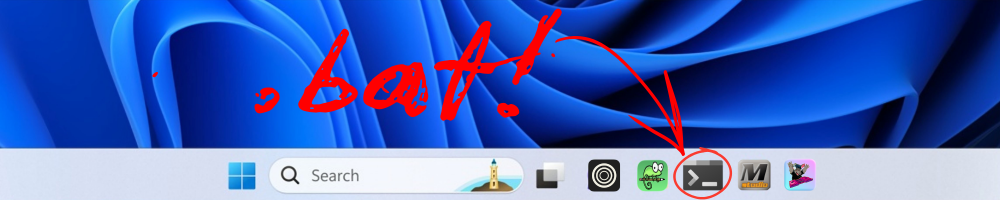
3. Drag the shortcut onto the taskbar.
Just pick it up and drop it on the taskbar. That's it. No incantations, no goat sacrifices, no registry hacking.
That's the step everyone leaves out. Don't ask the right-click menu for permission, because it will say no.
Why the usual advice fails
Changing the Target is necessary, and most guides get that part right. Windows will not pin a shortcut that points directly to a script, but if you use cmd.exe, it works. The last step is where the advice goes wrong. Blog posts, forums, and even AI summaries all repeat the same method, which probably worked in the past, back when you could leave your front door unlocked and Microsoft gave a toss. Now, taskbar pinning is stricter than Madam Cyn. (There's a reference that is going to age and place me.)
If dragging doesn't work for you either
Press Win+R, paste in %APPDATA%\Microsoft\Windows\Start Menu\Programs and hit Enter. Drop your edited shortcut in there. That folder is where the All Apps list lives, and apparently Windows then decides your script is a proper application and offers "Pin to taskbar" like a normal operating system. I haven't needed this, but plenty of people report it working.
Whilst we're here: changing the taskbar icon
Every script pinned this way gets the same black command prompt icon, which is no use at all once you've pinned two of them. You can change it, but not from the taskbar.
Right-click a pinned icon in Windows 11 and you'll be offered "Unpin from taskbar" and very little else. There's no Properties, and no Change Icon. The pinned item is a separate copy of the shortcut, stashed in %APPDATA%\Microsoft\Windows\Internet Explorer\Quick Launch\User Pinned\TaskBar, because obviously that's the logical place for it. Editing your original shortcut afterwards won't touch it either, because why would it?
Do it before you pin. In the shortcut's Properties, on the Shortcut tab, click "Change Icon". Windows will grumble that cmd.exe contains only one icon, which is true and unhelpful. Click OK and browse to either of these for a decent selection:
C:\Windows\System32\shell32.dll
C:\Windows\System32\imageres.dll
Or use your own .ico file if you have one. Pick your icon, click OK, then drag the shortcut to the taskbar.
If it's already pinned: unpin it, change the icon, drag it back on.
Anyway. Small thing. My script is on my taskbar with its own icon and I'm unreasonably pleased about it, which probably says more about my life than I'd care to admit. Still, a win's a win.

